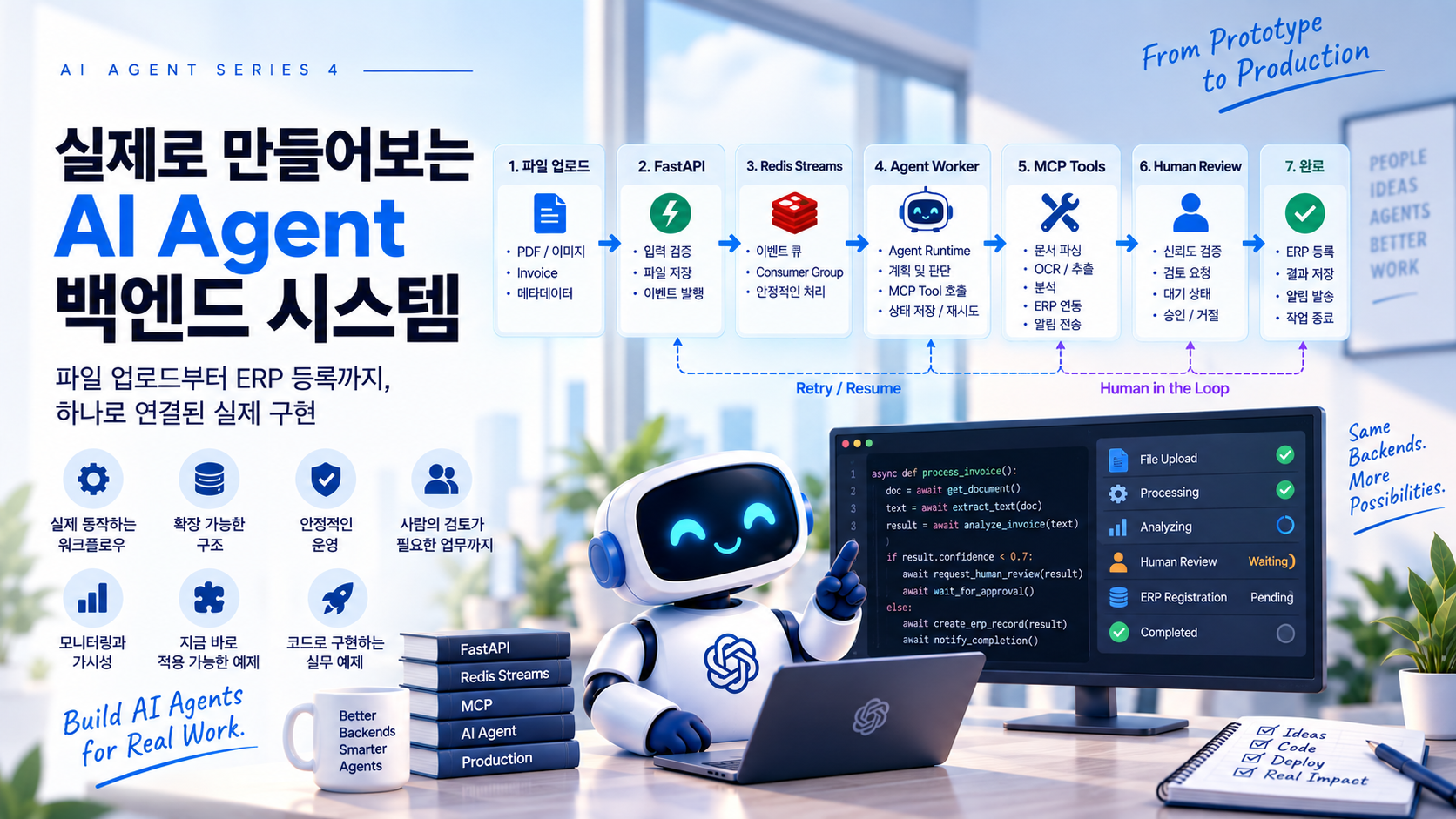
파일 업로드부터 Human Review, Pause/Resume까지 — AI Agent 시리즈 최종편
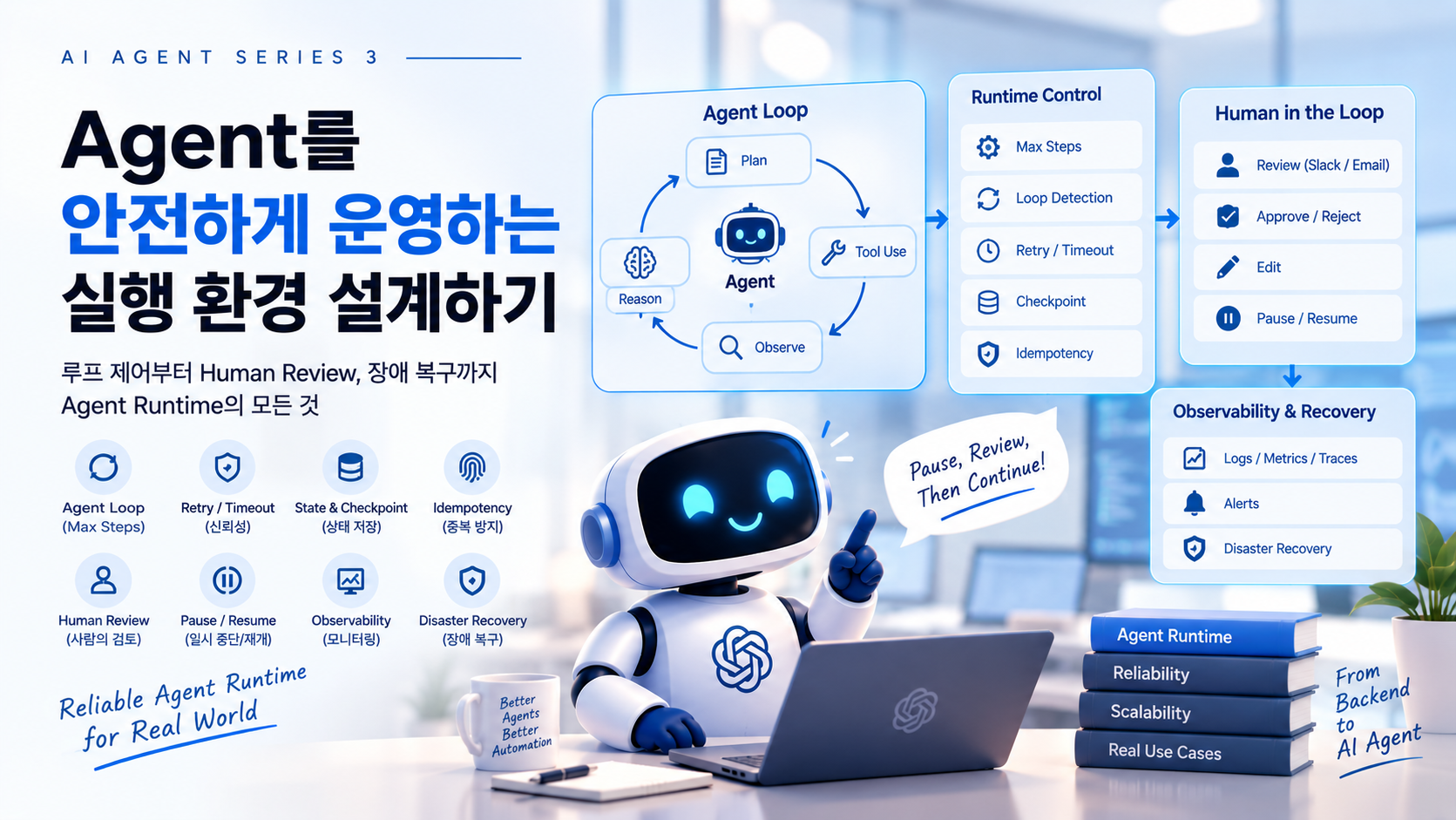
앞의 세 편에서 우리는 단순한 Worker에서 시작해 Agent Orchestrator, MCP Tool, 그리고 운영 가능한 Agent Runtime의 구조까지 살펴봤다.
이번 최종편의 목표는 지금까지 설명한 구성 요소를 실제로 연결하는 것이다.
Invoice Upload
      ↓
FastAPI
      ↓
Redis Streams
      ↓
Agent Worker
      ↓
Agent Runtime
      ↓
MCP Tools
      ↓
Invoice Analysis
      ↓
Confidence = 0.58
      ↓
Human Review
      ↓
WAITING_HUMAN
      ↓
Worker 종료

      ... 몇 시간 후 ...

Human APPROVE
      ↓
Redis Resume Event
      ↓
Agent Worker
      ↓
Load Checkpoint
      ↓
ERP Registration
      ↓
COMPLETED
완전한 상용 시스템 전체를 구현하기보다 실제 서비스로 확장할 수 있는 최소 구조를 만드는 데 집중한다.
1. 최종 아키텍처
                     User
                      │
                   Upload
                      ↓
                   FastAPI
                      │
            ┌─────────┴─────────┐
            ↓                   ↓
      Object Storage       Redis Streams
                                │
                                ↓
                           Agent Worker
                                │
                                ↓
                         Agent Runtime
                         ┌──────┴──────┐
                         ↓             ↓
                     State Store   Orchestrator
                                       │
                                       ↓
                                  LLM Decision
                                       │
                                       ↓
                                   MCP Client
                                       │
                                       ↓
                                   MCP Server
                                       │
                    ┌──────────────────┼──────────────────┐
                    ↓                  ↓                  ↓
              Document Tool      Analysis Tool      Business Tool
                    │                  │                  │
                    └──────────────────┼──────────────────┘
                                       ↓
                                  Service Layer
                                       │
                         ┌─────────────┼─────────────┐
                         ↓             ↓             ↓
                      Storage          DB        External API
FastAPI는 파일 업로드와 Review API, Redis Streams는 Start/Resume Event, Worker는 Runtime 실행, Runtime은 State와 종료 조건, Orchestrator는 다음 행동, MCP는 Tool 연결, Service Layer는 실제 업무를 담당한다.
2. 프로젝트 구조
agent-backend/
│
├── api/
│   ├── upload.py
│   └── review.py
├── agent/
│   ├── runtime.py
│   ├── orchestrator.py
│   ├── state.py
│   └── worker.py
├── mcp_server/
│   └── server.py
├── services/
│   ├── document_service.py
│   ├── analysis_service.py
│   ├── review_service.py
│   └── erp_service.py
├── repositories/
│   ├── agent_repository.py
│   └── document_repository.py
├── infrastructure/
│   ├── redis.py
│   └── database.py
└── main.py
처음부터 Microservice로 나눌 필요는 없다. 하나의 Python 프로젝트 안에서도 책임을 분리해두면 나중에 필요한 부분만 독립시킬 수 있다.
3. Agent State 정의
from dataclasses import dataclass, field
from typing import Any

@dataclass
class AgentState:
    run_id: str
    document_id: str
    status: str = "CREATED"
    step: int = 0
    last_tool: str | None = None
    retry_count: int = 0
    document_type: str | None = None
    confidence: float | None = None
    human_result: dict | None = None
    context: dict[str, Any] = field(default_factory=dict)
State는 단순한 LLM 대화 기록이 아니라 Agent Runtime이 중단되고 다시 실행되어도 복구할 수 있는 시스템 상태다.
4. State를 DB에 저장한다
CREATE TABLE agent_runs (
    run_id VARCHAR(64) PRIMARY KEY,
    document_id VARCHAR(64) NOT NULL,
    status VARCHAR(32) NOT NULL,
    current_step INT NOT NULL DEFAULT 0,
    last_tool VARCHAR(100),
    retry_count INT NOT NULL DEFAULT 0,
    state_json JSON NOT NULL,
    created_at DATETIME NOT NULL,
    updated_at DATETIME NOT NULL
);
Tool 실행 이력도 별도로 저장한다.
CREATE TABLE agent_steps (
    id BIGINT AUTO_INCREMENT PRIMARY KEY,
    run_id VARCHAR(64) NOT NULL,
    step_no INT NOT NULL,
    tool_name VARCHAR(100) NOT NULL,
    input_json JSON,
    output_json JSON,
    status VARCHAR(32) NOT NULL,
    error_message TEXT,
    started_at DATETIME NOT NULL,
    finished_at DATETIME,
    UNIQUE KEY uq_agent_step (run_id, step_no)
);
agent_runs는 현재 상태, agent_steps는 실행 이력을 담당한다.
5. 파일 업로드 API
from fastapi import APIRouter, UploadFile

router = APIRouter()

@router.post("/documents")
async def upload_document(file: UploadFile):
    document = await document_service.save(file)

    run = await agent_service.create_run(
        document_id=document.id
    )

    await event_bus.publish_start(
        run_id=run.run_id,
        document_id=document.id,
    )

    return {
        "document_id": document.id,
        "run_id": run.run_id,
        "status": "QUEUED",
    }
FastAPI가 직접 Agent를 실행하지 않는 것이 중요하다.
HTTP Request
     ↓
File Save
     ↓
Agent Run 생성
     ↓
Event Publish
     ↓
HTTP Response
6. Redis Streams에 START Event를 넣는다
import redis.asyncio as redis

redis_client = redis.Redis(
    host="localhost",
    port=6379,
    decode_responses=True,
)

async def publish_agent_start(run_id: str, document_id: str):
    await redis_client.xadd(
        "agent:events",
        {
            "event": "START",
            "run_id": run_id,
            "document_id": document_id,
        },
    )
7. Consumer Group
Stream: agent:events
        │
        ↓
Consumer Group: agent-workers
        │
    ┌───┼───┐
    ↓   ↓   ↓
   W1  W2  W3
async def ensure_consumer_group():
    try:
        await redis_client.xgroup_create(
            name="agent:events",
            groupname="agent-workers",
            id="0",
            mkstream=True,
        )
    except Exception as e:
        if "BUSYGROUP" not in str(e):
            raise
실제 운영에서는 구체적인 Redis 예외 타입을 처리하는 편이 좋다.
8. Agent Worker
async def run_worker(worker_name: str):
    while True:
        messages = await redis_client.xreadgroup(
            groupname="agent-workers",
            consumername=worker_name,
            streams={"agent:events": ">"},
            count=10,
            block=5000,
        )

        for stream, entries in messages:
            for message_id, data in entries:
                try:
                    await handle_event(data)

                    await redis_client.xack(
                        "agent:events",
                        "agent-workers",
                        message_id,
                    )
                except Exception:
                    logger.exception("Agent event failed")
Worker는 업무 규칙을 알 필요가 없다. Event를 받아 Runtime을 실행할 뿐이다.
9. START와 RESUME Event
async def handle_event(event):
    event_type = event["event"]

    if event_type == "START":
        state = await agent_repository.load(
            event["run_id"]
        )
        await agent_runtime.run(state)
        return

    if event_type == "RESUME":
        await resume_agent(event)
        return

    raise ValueError(f"Unknown event: {event_type}")
10. MCP Tool은 기존 Service를 감싼다
from mcp.server.fastmcp import FastMCP

mcp = FastMCP("document-agent-tools")

@mcp.tool()
def get_document(document_id: str) -> dict:
    return document_service.get_document(document_id)

@mcp.tool()
def extract_document_content(document_id: str) -> dict:
    return document_service.extract_content(document_id)

@mcp.tool()
def analyze_invoice(document_id: str) -> dict:
    return analysis_service.analyze_invoice(document_id)

@mcp.tool()
def request_human_review(
    run_id: str,
    document_id: str,
    reason: str,
) -> dict:
    return review_service.create_review(
        run_id=run_id,
        document_id=document_id,
        reason=reason,
    )

@mcp.tool()
def create_erp_record(
    document_id: str,
    operation_id: str,
) -> dict:
    return erp_service.create_invoice(
        document_id=document_id,
        operation_id=operation_id,
    )
MCP Server에는 Agent Runtime의 State 관리 코드를 넣지 않는다. Tool은 실제 업무 기능 제공에 집중한다.
11. Orchestrator의 역할
Orchestrator는 현재 State와 사용 가능한 MCP Tool을 보고 다음 행동을 결정한다.
Current State
      +
Available MCP Tools
      +
System Instruction
      ↓
LLM
      ↓
Next Action
예를 들어 System Instruction에는 다음과 같은 규칙을 넣을 수 있다.
You process uploaded business documents.

Use the available tools to analyze the document.

Do not call write tools unless the result has been validated.

If confidence is too low to safely continue,
request human review.

Never retry the same failed action indefinitely.

Finish when the document has been successfully processed.
하지만 Prompt만으로 모든 안전을 보장해서는 안 된다.
Max Steps, Permission, Idempotency, Timeout 같은 제한은 Runtime 코드에서도 적용해야 한다.
12. Decision 구조를 명시적으로 만든다
LLM의 응답을 자유로운 문자열로 받기보다 구조화된 Decision으로 다루는 편이 좋다.
from dataclasses import dataclass
from typing import Any


@dataclass
class AgentDecision:
    action: str

    tool_name: str | None = None
    arguments: dict[str, Any] | None = None

    reason: str | None = None
action은 다음 정도로 제한할 수 있다.
TOOL
FINISH
HUMAN_REVIEW
FAIL
그러면 Runtime은 LLM의 자연어를 직접 해석하는 대신 명확한 상태를 기준으로 동작할 수 있다.
13. Agent Runtime의 기본 Loop
이제 핵심인 Runtime을 만들어보자.
MAX_STEPS = 10


class AgentRuntime:

    async def run(self, state: AgentState):

        state.status = "RUNNING"

        await agent_repository.save(state)

        while state.step < MAX_STEPS:

            decision = await orchestrator.decide(
                state
            )

            if decision.action == "FINISH":

                state.status = "COMPLETED"

                await agent_repository.save(
                    state
                )

                return

            if decision.action == "FAIL":

                state.status = "FAILED"

                await agent_repository.save(
                    state
                )

                return

            if decision.action == "HUMAN_REVIEW":

                await self.pause_for_human(
                    state,
                    decision,
                )

                return

            await self.execute_tool(
                state,
                decision,
            )

        state.status = "MAX_STEPS_EXCEEDED"

        await agent_repository.save(state)
Runtime의 책임이 조금 더 명확해졌다.
Orchestrator
    ↓
무엇을 할지 결정

Runtime
    ↓
그 결정을 실행해도 되는지 통제

MCP
    ↓
실제 Tool 연결
14. Tool 실행 전 Policy를 검사한다
Agent가 Tool을 선택했다고 무조건 실행해서는 안 된다.
예를 들어 다음과 같이 Tool을 분류할 수 있다.
READ_TOOLS = {
    "get_document",
    "extract_document_content",
    "analyze_invoice",
}

WRITE_TOOLS = {
    "create_erp_record",
}
Write Tool에는 추가 검증을 적용한다.
async def validate_tool_call(
    state,
    decision,
):

    if decision.tool_name == "create_erp_record":

        if state.human_result is None:
            raise PermissionError(
                "Human approval is required"
            )

        if state.human_result["action"] != "APPROVE":
            raise PermissionError(
                "Invoice was not approved"
            )
LLM은 create_erp_record를 선택할 수 있다.
하지만 실제 실행 권한은 Runtime이 결정한다.
Tool Selection과 Tool Authorization은 서로 다른 문제다.
15. MCP Tool을 실행한다
개념적인 MCP Client 호출은 다음과 같다.
async def call_mcp_tool(
    tool_name: str,
    arguments: dict,
):

    result = await mcp_client.call_tool(
        tool_name,
        arguments=arguments,
    )

    return result
Runtime에서는 Tool 실행 전후로 Step을 기록한다.
async def execute_tool(
    self,
    state,
    decision,
):

    await validate_tool_call(
        state,
        decision,
    )

    state.step += 1

    step = await agent_repository.start_step(
        run_id=state.run_id,
        step_no=state.step,
        tool_name=decision.tool_name,
        arguments=decision.arguments,
    )

    try:

        result = await call_mcp_tool(
            decision.tool_name,
            decision.arguments,
        )

        await agent_repository.complete_step(
            step.id,
            result=result,
        )

        state.last_tool = decision.tool_name

        self.apply_result(
            state,
            decision.tool_name,
            result,
        )

        await agent_repository.save(state)

    except Exception as e:

        await agent_repository.fail_step(
            step.id,
            error=str(e),
        )

        raise
여기서 agent_repository.save(state)가 Checkpoint 역할을 한다.
16. Tool Result를 State에 반영한다
Tool마다 반환 결과가 다르다.
예를 들어 analyze_invoice 결과가 다음과 같다고 하자.
{
  "document_type": "invoice",
  "vendor": "ABC Corp",
  "amount": 12500000,
  "confidence": 0.58
}
State에 필요한 정보를 반영한다.
def apply_result(
    self,
    state,
    tool_name,
    result,
):

    state.context[
        tool_name
    ] = result

    if tool_name == "analyze_invoice":

        state.document_type = (
            result["document_type"]
        )

        state.confidence = (
            result["confidence"]
        )
전체 Tool Result를 LLM Context에 계속 쌓을 필요는 없다.
DB에는 전체 이력을 보관하고, Orchestrator에는 현재 판단에 필요한 State만 전달하는 방식이 더 효율적이다.
17. Invoice 분석 결과가 0.58이라면
이제 실제 시나리오를 따라가 보자.
Agent는 다음 순서로 Tool을 호출했다.
Step 1
get_document
      ↓
SUCCESS

Step 2
extract_document_content
      ↓
SUCCESS

Step 3
analyze_invoice
      ↓
confidence = 0.58
Orchestrator가 다음 Decision을 반환한다.
{
  "action": "HUMAN_REVIEW",
  "reason": "Invoice analysis confidence is too low"
}
Runtime은 더 이상 Tool을 계속 호출하지 않는다.
Human Review 상태로 전환한다.
18. Human Review Task를 만든다
async def pause_for_human(
    self,
    state,
    decision,
):

    review = await review_service.create(
        run_id=state.run_id,
        document_id=state.document_id,
        reason=decision.reason,
        data=state.context.get(
            "analyze_invoice"
        ),
    )

    state.status = "WAITING_HUMAN"

    state.context["review_id"] = (
        review.id
    )

    await agent_repository.save(state)
여기서 중요한 부분은 마지막이다.
return
Runtime은 종료된다.
Worker도 이 Event 처리를 끝낸다.
Agent Runtime
      ↓
WAITING_HUMAN
      ↓
Checkpoint Save
      ↓
return
      ↓
Worker는 다음 Event 처리
Agent가 몇 시간 동안 살아 있는 것이 아니다.
Agent Run의 상태만 살아 있다.
19. Human Review API
담당자가 Review 화면에서 결과를 확인한다고 해보자.
API는 다음과 같이 만들 수 있다.
from pydantic import BaseModel


class ReviewRequest(BaseModel):
    action: str
    edited_data: dict | None = None


@router.post(
    "/reviews/{review_id}"
)
async def submit_review(
    review_id: str,
    request: ReviewRequest,
):

    review = await review_service.complete(
        review_id=review_id,
        action=request.action,
        edited_data=request.edited_data,
    )

    await event_bus.publish_resume(
        run_id=review.run_id,
        review_id=review.id,
    )

    return {
        "status": "ACCEPTED"
    }
가능한 Action은 예를 들어 다음과 같다.
APPROVE
REJECT
EDIT
20. Resume Event를 Redis Streams에 넣는다
async def publish_resume(
    run_id: str,
    review_id: str,
):

    await redis_client.xadd(
        "agent:events",
        {
            "event": "RESUME",
            "run_id": run_id,
            "review_id": review_id,
        },
    )
Redis에는 다음과 같은 Event가 들어간다.
XADD agent:events *
     event RESUME
     run_id run_123
     review_id review_123
Worker 입장에서는 START와 RESUME 모두 그냥 Event다.
21. Resume 처리
async def resume_agent(event):

    state = await agent_repository.load(
        event["run_id"]
    )

    if state.status != "WAITING_HUMAN":
        return

    review = await review_service.get(
        event["review_id"]
    )

    state.human_result = {
        "action": review.action,
        "edited_data": review.edited_data,
    }

    state.status = "RUNNING"

    await agent_repository.save(state)

    await agent_runtime.run(state)
이제 Agent는 5시간 전의 Python 프로세스가 아니다.
새로운 Worker가 DB에서 State를 읽고 논리적인 Agent Run을 이어간다.
22. REJECT라면 어떻게 할까?
Human Review 결과가 REJECT라면 굳이 LLM에게 다시 물어볼 필요가 없을
수도 있다.
if review.action == "REJECT":

    state.status = "FAILED"

    state.context[
        "failure_reason"
    ] = "Rejected by human"

    await agent_repository.save(state)

    return
이것은 의미적 판단이 아니라 명확한 업무 규칙이다.
코드가 처리하는 것이 더 좋다.
23. EDIT라면 어떻게 할까?
담당자가 Invoice 데이터를 수정했다고 해보자.
{
  "action": "EDIT",
  "edited_data": {
    "vendor": "ABC Corporation",
    "amount": 12450000
  }
}
이 경우 State에 수정 결과를 넣고 Agent에게 다시 판단을 맡길 수 있다.
if review.action == "EDIT":

    state.context[
        "human_edited_invoice"
    ] = review.edited_data
Agent는 다음 단계에서 다시 Validation Tool을 호출하거나 ERP 등록을 선택할 수 있다.
24. APPROVE라면 ERP 등록
승인이 완료되면 다음 Tool을 호출할 수 있다.
Human APPROVE
      ↓
Agent Resume
      ↓
create_erp_record
하지만 ERP 등록은 Write Tool이다.
반복 실행에 안전해야 한다.
25. ERP Tool에 Idempotency를 적용한다
operation_id를 Agent Run과 업무 작업을 조합해서 만든다.
operation_id = (
    f"{state.run_id}:create_erp_record"
)
MCP Tool 호출은 다음과 같다.
{
  "document_id": "doc_123",
  "operation_id": "run_123:create_erp_record"
}
ERP Service에서는 이미 처리한 Operation인지 확인한다.
def create_invoice(
    document_id: str,
    operation_id: str,
):

    existing = operation_repository.find(
        operation_id
    )

    if existing:
        return existing.result

    result = erp_client.create_invoice(
        document_id
    )

    operation_repository.save(
        operation_id=operation_id,
        result=result,
    )

    return result
Worker가 ERP 등록 직후 죽더라도 같은 operation_id로 다시 실행하면 중복
등록을 막을 수 있다.
26. Redis Streams에서도 장애 복구를 생각해야 한다
Consumer가 메시지를 읽은 뒤 XACK하기 전에 죽을 수 있다.
XREADGROUP
     ↓
Agent 실행
     ↓
Worker Crash
     ↓
XACK 못함
이 메시지는 Pending 상태로 남는다.
따라서 운영 환경에서는 Pending Entry를 감시하고 일정 시간 이상 처리되지 않은 메시지를 다른 Worker가 Claim하는 전략이 필요하다.
개념적으로는 다음과 같다.
Pending Message
      ↓
Idle Time > Threshold
      ↓
Claim
      ↓
Another Worker
      ↓
Resume Processing
Redis Streams의 전달 보장과 Agent Tool의 Idempotency는 함께 생각해야 한다.
Queue가 메시지를 다시 전달할 수 있기 때문이다.
27. Runtime Retry와 Tool Retry를 구분한다
OCR API가 일시적으로 실패하는 것은 Tool 내부에서 Retry할 수 있다.
Technical Failure
      ↓
Tool Retry
반면 Invoice 분석 신뢰도가 낮아 다른 방법을 선택하는 것은 Agent의 판단이다.
Semantic Failure
      ↓
Agent Decision
Runtime에서는 Tool의 결과를 보고 다음과 같이 처리할 수 있다.
if result.get("retryable"):

    state.retry_count += 1

    if state.retry_count > 3:
        state.status = "FAILED"
다만 네트워크 재시도와 의미적 재시도를 같은 Counter로 관리하지 않는 편이 더 명확하다.
28. Loop Detection
Max Steps만으로도 무한 실행은 막을 수 있지만 반복 패턴을 감지하면 더 빨리 중단할 수 있다.
extract_document_content
run_ocr
extract_document_content
run_ocr
최근 Tool History를 확인한다.
def has_repeating_pattern(
    history: list[str],
) -> bool:

    if len(history) < 4:
        return False

    last_four = history[-4:]

    return (
        last_four[0] == last_four[2]
        and
        last_four[1] == last_four[3]
    )
Loop가 감지되면 Human Review로 보내거나 실패 처리할 수 있다.
29. Agent Run을 어떻게 관찰할까?
관리 화면에서는 최소한 다음 정도를 볼 수 있으면 좋다.
Run ID
Document
Status
Current Step
Last Tool
Started At
Updated At
LLM Calls
Tool Calls
Token Usage
Estimated Cost
Human Review
Error
하나의 Run을 클릭하면 Timeline을 보여줄 수 있다.
10:00:01 START

10:00:02 get_document
         SUCCESS

10:00:03 extract_document_content
         SUCCESS

10:00:05 analyze_invoice
         confidence = 0.58

10:00:06 HUMAN_REVIEW
         WAITING

15:14:22 HUMAN_APPROVE

15:14:23 RESUME

15:14:25 create_erp_record
         SUCCESS

15:14:26 COMPLETED
Agent 시스템에서는 이런 Timeline이 디버깅에 특히 유용하다.
30. 비용도 Run 단위로 기록한다
LLM을 여러 번 호출하는 Agent는 일반 API보다 비용 구조가 복잡하다.
agent_usage

run_id
step_no
model
input_tokens
output_tokens
cost
latency_ms
그러면 다음과 같은 지표를 계산할 수 있다.
Average Cost per Run

Average LLM Calls per Run

Average Tool Calls per Run

Human Review Rate

Completion Rate

Average Steps

P95 Run Duration
Agent가 유연해졌지만 고정 Workflow보다 비용이 지나치게 증가하고 있지는 않은지 확인할 수 있다.
31. 전체 실행 흐름을 다시 따라가 보자
이제 처음부터 끝까지 한 번에 연결해보자.
1단계 — Upload
User
  ↓
POST /documents
  ↓
Object Storage
  ↓
Document Record
  ↓
Agent Run 생성
State:
{
  "run_id": "run_123",
  "document_id": "doc_123",
  "status": "CREATED",
  "step": 0
}
2단계 — START Event
XADD agent:events *
     event START
     run_id run_123
Worker가 Event를 읽는다.
Redis Streams
      ↓
Agent Worker
      ↓
Load State
      ↓
Agent Runtime
3단계 — Document 처리
get_document
      ↓
extract_document_content
      ↓
analyze_invoice
결과:
{
  "vendor": "ABC Corp",
  "amount": 12500000,
  "confidence": 0.58
}
4단계 — Human Review
confidence = 0.58
      ↓
HUMAN_REVIEW
      ↓
Review Task 생성
      ↓
Checkpoint
      ↓
WAITING_HUMAN
      ↓
Runtime 종료
이 시점에 실행 중인 Agent 프로세스는 없다.
DB에 논리적인 Agent Run만 남아 있다.
5단계 — 5시간 뒤 승인
Human
  ↓
APPROVE
  ↓
POST /reviews/review_123
Resume Event가 발생한다.
XADD agent:events *
     event RESUME
     run_id run_123
6단계 — Resume
Agent Worker
      ↓
Load State
      ↓
Load Human Result
      ↓
RUNNING
      ↓
Agent Runtime
7단계 — ERP 등록
create_erp_record
      ↓
operation_id 확인
      ↓
ERP API
      ↓
SUCCESS
8단계 — 완료
{
  "run_id": "run_123",
  "document_id": "doc_123",
  "status": "COMPLETED",
  "last_tool": "create_erp_record"
}
최종 Timeline은 다음과 같다.
Invoice Upload
      ↓
Agent Start
      ↓
get_document
      ↓
extract_document_content
      ↓
analyze_invoice
      ↓
confidence = 0.58
      ↓
Human Review
      ↓
Checkpoint
      ↓
WAITING_HUMAN

      ... 5시간 후 ...

Human APPROVE
      ↓
Resume Event
      ↓
Load Checkpoint
      ↓
Agent Resume
      ↓
create_erp_record
      ↓
COMPLETED
32. 이 구조에서 Agent가 실제로 판단하는 것은 생각보다 많지 않다
전체 시스템을 보면 Agent가 모든 것을 결정하는 것처럼 보일 수 있다.
하지만 실제로 Agent가 판단할 영역을 다시 분리해보면 그렇지 않다.
코드가 담당하는 영역:
File Size Limit
Authentication
Authorization
State Transition
Max Steps
Timeout
Retry Limit
Idempotency
Consumer Recovery
Unique Constraint
Human Approval Policy
Agent가 담당할 수 있는 영역:
Document Classification
Tool Selection
OCR 필요 여부
Alternative Analysis Strategy
Semantic Validation
Additional Analysis 필요 여부
Human Review 필요 여부
이 구분이 중요하다.
LLM이 잘하는 것은 모호한 상황에서 의미를 해석하고 다음 행동을 선택하는 것이다.
반면 시스템의 안전성과 일관성을 보장하는 것은 코드가 더 잘한다.
33. “Agent가 알아서 한다”는 표현을 조심해야 한다
Agent 시스템을 설명할 때 흔히 다음과 같이 표현한다.
“Agent가 알아서 Tool을 선택하고 업무를 처리한다.”
개념적으로는 맞다.
하지만 운영 시스템에서는 조금 더 정확하게 표현하는 편이 좋다.
Agent
    ↓
허용된 범위 안에서
    ↓
사용 가능한 Tool 중
    ↓
현재 Context에 적합한 행동을 제안한다
    ↓
Runtime Policy 검증
    ↓
실행
즉 Agent의 자유는 Runtime이 허용한 경계 안에서의 자유다.
이 경계가 없다면 Agent는 자동화 시스템이 아니라 예측하기 어려운 프로그램이 될 수 있다.
34. MCP를 사용하는 이유도 다시 명확해진다
이번 시스템에서 MCP가 Agent Runtime을 만들어준 것은 아니다.
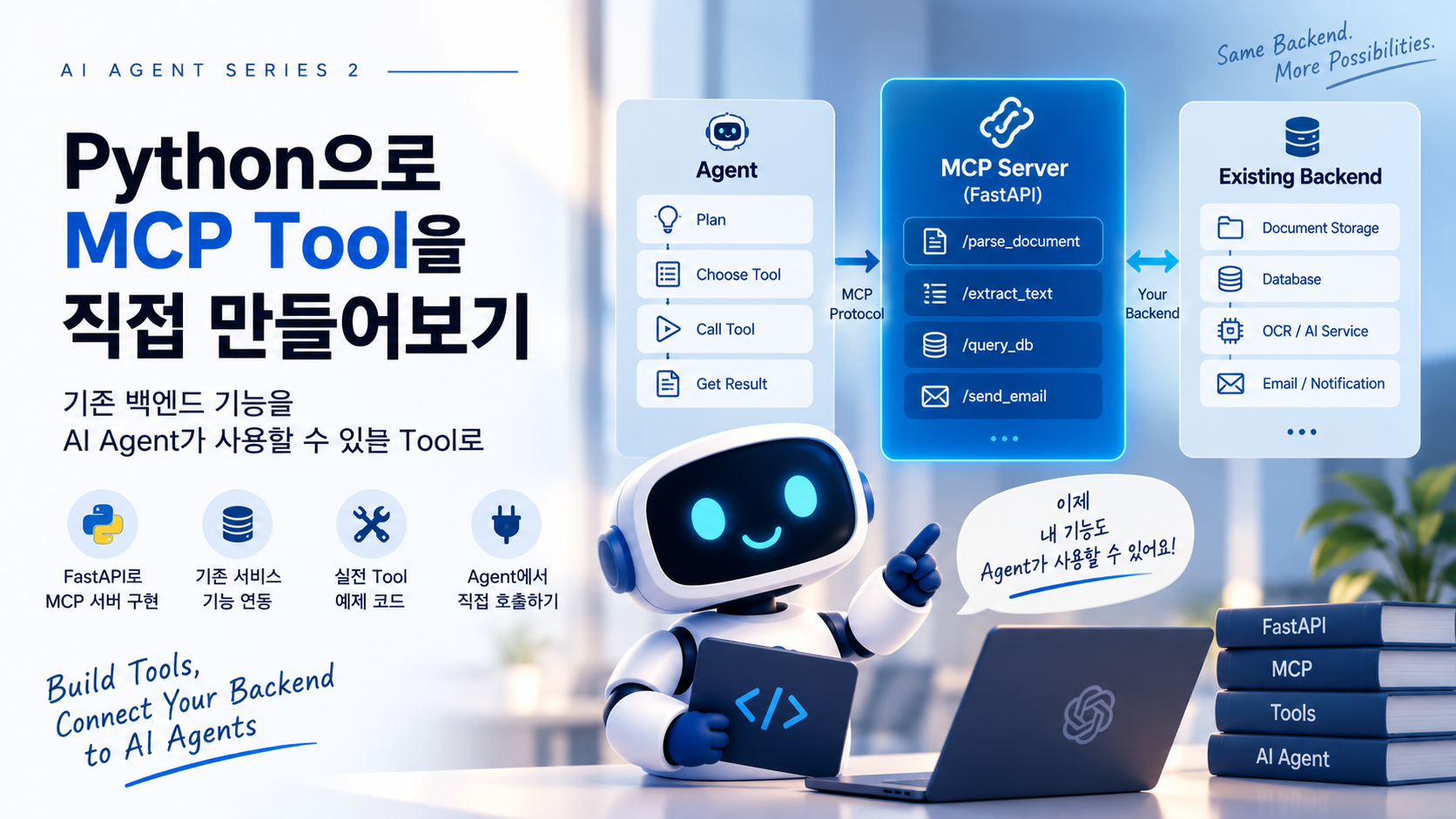
Redis Streams를 대신한 것도 아니다.
State Store를 제공한 것도 아니다.
Human Review를 구현해준 것도 아니다.
MCP가 담당한 것은 명확하다.
Agent
  ↓
"What can I do?"
  ↓
MCP
  ↓
Available Capabilities
예를 들어 기존 백엔드에 다음 기능이 있었다.
Document Service
OCR Service
Invoice Analyzer
ERP Service
Notification Service
MCP를 통해 이것을 Agent가 사용할 수 있는 Capability로 제공했다.
get_document
run_ocr
analyze_invoice
create_erp_record
send_notification
MCP의 가치는 기존 백엔드의 능력을 Agent가 사용할 수 있는 공통 인터페이스로 연결하는 데 있다.
35. 처음부터 모든 것을 MCP로 만들 필요도 없다
기존 시스템에 REST API가 있다면 MCP Tool 내부에서 REST API를 호출해도 된다.
Agent
  ↓
MCP Tool
  ↓
REST API
  ↓
Existing Service
같은 프로세스 안의 Service Layer를 직접 호출할 수도 있다.
Agent
  ↓
MCP Tool
  ↓
Service Layer
  ↓
Repository
중요한 것은 기술을 많이 사용하는 것이 아니다.
기존 시스템의 경계를 유지하면서 Agent에게 필요한 Capability를 제공하는 것이다.
36. 실제 서비스로 확장한다면
이번 예제를 Production 수준으로 확장한다면 다음 항목을 추가로 고려할 수 있다.
Authentication / Authorization

Tenant Isolation

Tool Permission

Secret Management

Distributed Lock

Pending Message Recovery

Dead Letter Queue

Rate Limit

Circuit Breaker

Structured Logging

Tracing

Metrics

LLM Cost Tracking

Prompt / Tool Versioning

Agent Evaluation

Human Review SLA

Audit Log
특히 Multi-Tenant SaaS라면 모든 Tool 호출에 Tenant Context를 명확하게 전달하고 서버 측에서 다시 검증해야 한다.
Agent가 전달한 tenant_id를 그대로 신뢰해서는 안 된다.
37. Agent Version도 기록하는 것이 좋다
Agent Prompt와 Tool Description이 변경되면 같은 문서에서도 실행 결과가 달라질 수 있다.
따라서 Run에 다음 정보를 기록하는 것이 좋다.
{
  "agent_version": "1.3.0",
  "prompt_version": "invoice-v4",
  "toolset_version": "2026-09-01",
  "model": "example-model"
}
나중에 품질이 갑자기 달라졌을 때 어떤 변경 때문인지 추적하기 쉬워진다.
Agent도 결국 운영되는 Software다.
Versioning이 필요하다.
38. 테스트는 어떻게 할까?
Agent 시스템이라고 테스트를 LLM에게 맡길 수는 없다.
계층별로 나누는 것이 좋다.
Tool Test
Input
 ↓
Tool
 ↓
Expected Output
Tool 자체는 가능한 한 Deterministic하게 테스트한다.
Runtime Test
LLM Decision을 Mock으로 고정할 수 있다.
Decision 1 = get_document
Decision 2 = analyze_invoice
Decision 3 = HUMAN_REVIEW
그 상태에서 Runtime이 올바르게 State를 전환하는지 확인한다.
Resume Test
WAITING_HUMAN
      ↓
APPROVE Event
      ↓
RUNNING
      ↓
COMPLETED
Failure Test
Tool Timeout
Worker Crash
Duplicate Event
Duplicate Write
Redis Redelivery
Human Review Expired
Happy Path보다 이런 테스트가 운영 환경에서는 더 중요할 수 있다.
39. Agent Evaluation도 필요하다
Runtime이 안정적이라고 Agent의 판단이 좋은 것은 아니다.
다음 질문은 별도의 Evaluation 영역이다.
올바른 Tool을 선택했는가?

불필요한 Tool을 호출하지 않았는가?

Human Review를 너무 자주 요청하지 않는가?

잘못된 문서를 Invoice로 분류하지 않는가?

비용 대비 충분히 좋은 결과를 내는가?
따라서 두 가지 품질을 구분할 필요가 있다.
Runtime Reliability
        +
Agent Decision Quality
둘 다 좋아야 실제 업무에서 사용할 수 있다.
40. 최종 아키텍처
이번 시리즈에서 만든 구조를 마지막으로 한 번 정리해보자.
                         ┌──────────────────┐
                         │       User       │
                         └────────┬─────────┘
                                  │
                               Upload
                                  │
                                  ↓
                         ┌──────────────────┐
                         │     FastAPI      │
                         └────────┬─────────┘
                                  │
                     ┌────────────┴────────────┐
                     ↓                         ↓
              Object Storage             Redis Streams
                                               │
                                               ↓
                                         Agent Worker
                                               │
                                               ↓
                                        Agent Runtime
                                  ┌────────────┼────────────┐
                                  ↓            ↓            ↓
                               State      Orchestrator   Checkpoint
                                               │
                                               ↓
                                          LLM Decision
                                               │
                                               ↓
                                           MCP Client
                                               │
                                               ↓
                                           MCP Server
                                               │
                             ┌─────────────────┼─────────────────┐
                             ↓                 ↓                 ↓
                         Document          Analysis          Business
                           Tools             Tools             Tools
                             │                 │                 │
                             └─────────────────┼─────────────────┘
                                               ↓
                                          Service Layer
                                               │
                              ┌────────────────┼────────────────┐
                              ↓                ↓                ↓
                           Storage          Database       External API
                                                                 │
                                                                 ↓
                                                               ERP

Human Review
     │
     └──────────→ Resume Event ──────────→ Redis Streams
이 구조에서 Agent는 시스템 전체가 아니다.
Agent는 기존 백엔드 위에 추가된 의사결정 계층이다.
41. 이 시리즈에서 말하고 싶었던 것
처음의 질문은 단순했다.
파일이 업로드되면 Agent가 깨어나 알아서 분석하고 저장하도록 만들 수 없을까?
가능하다.
하지만 실제 시스템을 만들어보면 중요한 것은 “Agent가 얼마나 똑똑한가”만이 아니다.
Event를 어떻게 전달할 것인가?

State를 어디에 저장할 것인가?

실패하면 어떻게 복구할 것인가?

중복 실행을 어떻게 막을 것인가?

사람이 필요하면 어떻게 멈출 것인가?

몇 시간 뒤 어떻게 다시 시작할 것인가?

Agent에게 어디까지 권한을 줄 것인가?

무엇을 했는지 어떻게 추적할 것인가?
결국 우리가 다시 만나게 되는 것은 익숙한 백엔드 엔지니어링 문제들이다.
Queue, State, Retry, Idempotency, Timeout, Authorization, Observability, Recovery.
Agent가 등장했다고 이 문제들이 사라지는 것은 아니다.
오히려 Agent의 실행 경로가 동적으로 변하기 때문에 더 중요해진다.
42. 가장 중요한 원칙
이 시리즈를 한 문장으로 정리한다면 다음과 같다.
Agent에게 판단을 맡기되, 실행의 통제권까지 모두 넘기지는 않는다.
코드가 잘하는 것은 코드에게 맡긴다.
Permission
Timeout
Retry Limit
Idempotency
State Transition
Validation
Agent가 잘하는 것은 Agent에게 맡긴다.
Semantic Understanding
Tool Selection
Contextual Decision
Alternative Strategy
Human Review 판단
그리고 MCP가 그 둘 사이에서 기존 백엔드의 Capability를 Agent에게 연결한다.
Backend Capability
        ↓
       MCP
        ↓
      Agent
이렇게 보면 Agent 시스템은 기존 백엔드와 완전히 다른 새로운 세계가 아니다.
우리가 이미 알고 있는 Backend Architecture 위에 LLM 기반 의사결정 계층을 추가하는 것에 가깝다.
시리즈를 마치며
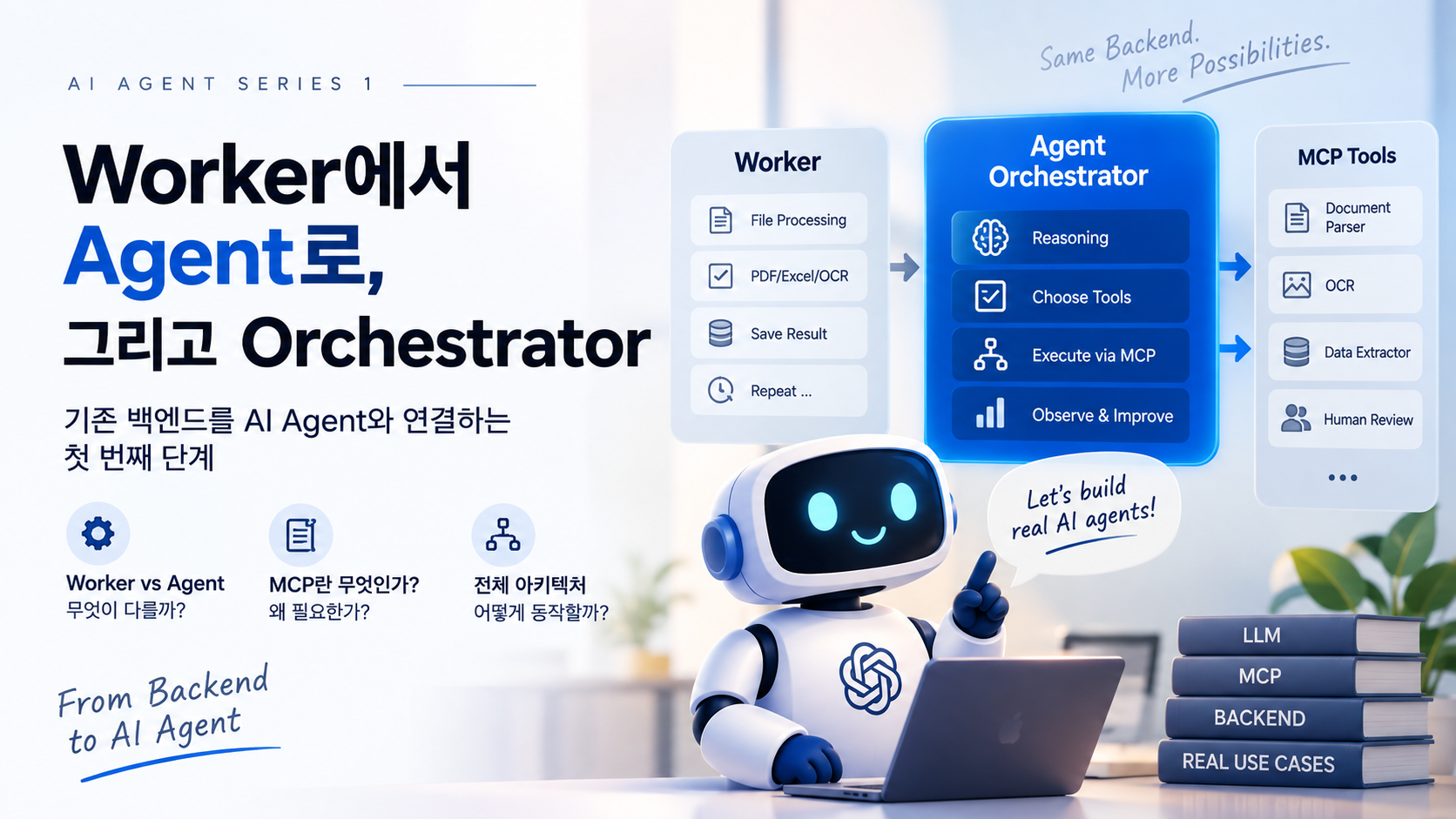
Part 1에서는 Worker에서 Agent Orchestrator로 넘어가는 이유를 살펴봤다.
Part 2에서는 Python으로 MCP Tool을 만들었다.
Part 3에서는 Agent Loop, State, Retry, Checkpoint, Human-in-the-Loop을 통해 운영 가능한 Agent Runtime을 설계했다.
그리고 이번 Part 4에서는 그것들을 하나로 연결했다.
Part 1
Why Agent?

        ↓

Part 2
How to build MCP Tools?

        ↓

Part 3
How to run Agents safely?

        ↓

Part 4
How to connect everything?
처음에는 단순한 Worker였다.
File
 ↓
Worker
 ↓
Result
마지막에는 다음 구조가 되었다.
Event
 ↓
Agent Runtime
 ↓
Decision
 ↓
MCP Tool
 ↓
Existing Backend
 ↓
State / Human / Recovery
Agent를 실제 업무에 연결하는 순간부터 중요한 것은 멋진 Demo가 아니다.
실패해도 복구되고, 중복 실행에도 안전하고, 사람이 개입할 수 있으며, 어떤 판단과 실행이 있었는지 추적할 수 있는 시스템을 만드는 것이다.
그 위에서 Agent의 판단 능력이 비로소 실제 비즈니스의 자동화 능력이 된다.